Quote Details
Set quote titles, reference numbers, issue dates, expiration periods, and select layouts. Toggle native e-Signatures.
Create, edit, price, and publish professional quotes directly inside HubSpot Deal records in seconds — no context switching or copy-pasting required.
Note: This card only supports HubSpot's native CPQ Quote objects.
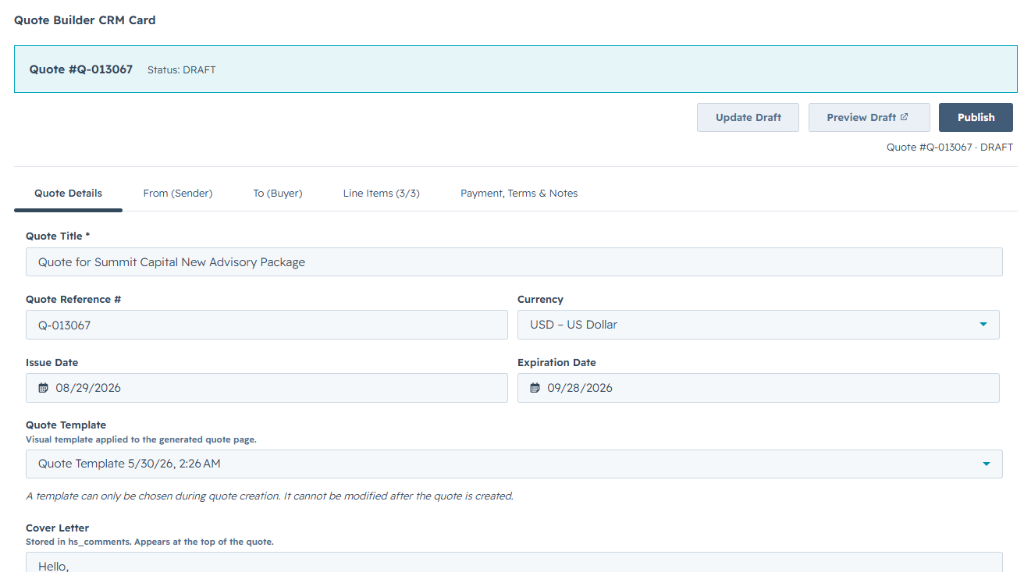
Quote Builder for HubSpot is a HubSpot Marketplace Certified App that integrates a full-featured quote creation workflow directly inside HubSpot Deal records using the latest HubSpot UI Extensions platform.
Your sales reps can open any Deal, select the Quote Builder tab, and fill out a structured multi-tab form: Quote Details, Sender Info, Line Items, Pricing Summary, and Terms. Quotes generated are native HubSpot Quote objects — automatically associated with the Deal, Company, and Contacts.
Administrators configure the app from a Connected Apps page: restrict the card to specific stages, set sender company defaults, and configure currency defaults that pre-fill on every new quote.
The table below outlines the specific HubSpot scopes and objects Quote Builder CRM Card reads or writes:
| HubSpot Object | Scope Requested | Direction | What Is Accessed |
|---|---|---|---|
| Deals | crm.objects.deals.read / write |
Two-way Sync | Read deal details. Associate quotes and line items to deal. |
| Quotes | crm.objects.quotes.read / write |
Two-way Sync | Create, edit, and publish native quote objects and template layouts. |
| Line Items | crm.objects.line_items.read / write |
Two-way Sync | Read and create quote line items. Sync items back to Deal. |
| Contacts | crm.objects.contacts.read |
Sync From HubSpot | Read associated contacts to add as buyer or signers. |
| Companies | crm.objects.companies.read |
Sync From HubSpot | Read company details for pre-filled billing info. |
| Products | e-commerce |
Sync To HubSpot | Search and read products from HubSpot product libraries. |
| Owners | crm.objects.owners.read |
Sync From HubSpot | Read deal owner details to pre-fill sender information. |
Built natively inside HubSpot. No tab switching, no copy-pasting. Quotes in seconds.
Set quote titles, reference numbers, issue dates, expiration periods, and select layouts. Toggle native e-Signatures.
Real-time breakdown: subtotal, discounts, taxes, and Total Contract Value. Updates automatically as items change.
Pre-fill terms, payment schedules, and acceptance notices. Basic HTML formatting is fully supported.
Quotes are native objects associated with Deals, Companies, and Contacts. Appears in HubSpot quotes lists immediately.
Preview the published quote exactly as the buyer will see it. Opens the HubSpot quote page inside a modal overlay.
Admins restrict the card to specific deal pipeline stages, set company defaults, and default currencies.
Select the ideal tier for your sales workflow. Start on the Free plan or upgrade for higher limits.
Quick answers regarding requirements, billing, features, and platform updates.
Quote Builder CRM Card itself is compatible with any HubSpot account that utilizes quotes (Starter and above). However, certain HubSpot-native advanced features require qualifying Revenue Hub tiers:
Check the following steps:
Because the app creates native HubSpot Quote objects, quotes appear instantly in all native HubSpot directories:
Reach out to our customer care team or read details on installation troubleshooting.